


Most Shopify merchants think about accessibility, if they think about it at all, as a checkbox somewhere in the launch process. It rarely makes the priority list against revenue targets, conversion optimisation, or the next product drop. But accessibility quietly sits at the intersection of two things every store owner cares about deeply: legal exposure and lost sales. Ignore it, and you risk both a lawsuit and a meaningful slice of your addressable market walking away because they literally cannot use your store.
This guide breaks down what WCAG compliance actually means for a Shopify store, the very real legal risk of getting it wrong, the customers you lose by ignoring it, and a practical roadmap to audit and fix your theme.
What WCAG Actually Means
WCAG stands for the Web Content Accessibility Guidelines, a set of standards published by the World Wide Web Consortium (W3C). They define how to make web content usable by people with disabilities — including those with visual, auditory, motor, and cognitive impairments. WCAG is the global reference point that nearly every accessibility law, regulation, and lawsuit points back to.
The guidelines are organised around four principles, often remembered by the acronym POUR:
- Perceivable: Content must be presentable in ways users can perceive — for example, text alternatives for images and sufficient color contrast.
- Operable: Interface components and navigation must be usable — everything should work with a keyboard, not just a mouse.
- Understandable: Information and the operation of the interface must be understandable — predictable navigation and clear error messages.
- Robust: Content must be robust enough to work reliably with assistive technologies like screen readers.
WCAG has three conformance levels: A (the minimum), AA (the widely accepted target), and AAA (the strictest). For ecommerce, WCAG 2.1 Level AA is the practical benchmark. It is the level referenced in most legal settlements and the standard most courts and regulators expect businesses to meet.
The Legal Risk Is Real — and Growing
This is the part that turns accessibility from a “nice to have” into a board-level concern. Web accessibility lawsuits against ecommerce businesses have surged over the past several years, and online retailers are by far the most frequently targeted category.
The ADA and Digital Storefronts
In the United States, the Americans with Disabilities Act (ADA) was written before the modern web existed, but courts have increasingly interpreted Title III — which prohibits discrimination in “places of public accommodation” — to apply to websites and mobile apps. The practical result: if your Shopify store sells to U.S. customers and a person with a disability cannot use it, you may be exposed to a demand letter or lawsuit, regardless of your business size.
A common misconception is that only large brands get sued. In reality, small and mid-sized merchants are frequently targeted precisely because they are less likely to have remediated their sites and more likely to settle quickly rather than fight a costly legal battle. Many of these cases never reach a courtroom — they are resolved through settlements that often range from several thousand to tens of thousands of dollars, plus the cost of emergency remediation and legal fees.
It’s Not Just the United States
Accessibility law is global. The European Accessibility Act (EAA) extends accessibility obligations to a broad range of digital products and ecommerce services across EU member states, meaning merchants selling into Europe face their own compliance requirements. The UK has the Equality Act, Canada has the Accessible Canada Act and provincial laws like AODA in Ontario, and many other jurisdictions have parallel frameworks. If you sell internationally — something many Shopify merchants actively pursue — you inherit accessibility obligations in those markets too.
Why “Shopify Handles It” Is a Dangerous Assumption
Shopify provides a solid technical foundation, and its newer themes are built with accessibility in mind. But compliance is not something the platform can fully guarantee on your behalf. The moment you choose a theme, customise it, install apps, upload product images, write product descriptions, or add a custom section, you introduce accessibility decisions that are entirely yours. A perfectly accessible base theme can be rendered non-compliant by a single poorly built app or a homepage banner with unreadable text. Responsibility for the storefront you actually publish rests with you, the merchant — not with Shopify.
The Customers You’re Losing
The legal angle gets attention, but the commercial case is just as compelling and far more often overlooked. Roughly one in four adults’ lives with some form of disability. That is an enormous segment of potential buyers, and many of them have significant spending power that simply routes around stores they cannot use.
Consider what an inaccessible store actually does to real shoppers:
- Blind and low-vision users: A customer using a screen reader reaches your product page, but your images have no alt text and your “Add to Cart” button is an unlabeled icon. They cannot complete the purchase, so they leave.
- Motor-impaired users: A shopper with a motor impairment navigates entirely by keyboard, but your checkout fields and dropdowns can only be operated with a mouse. The sale dies at checkout.
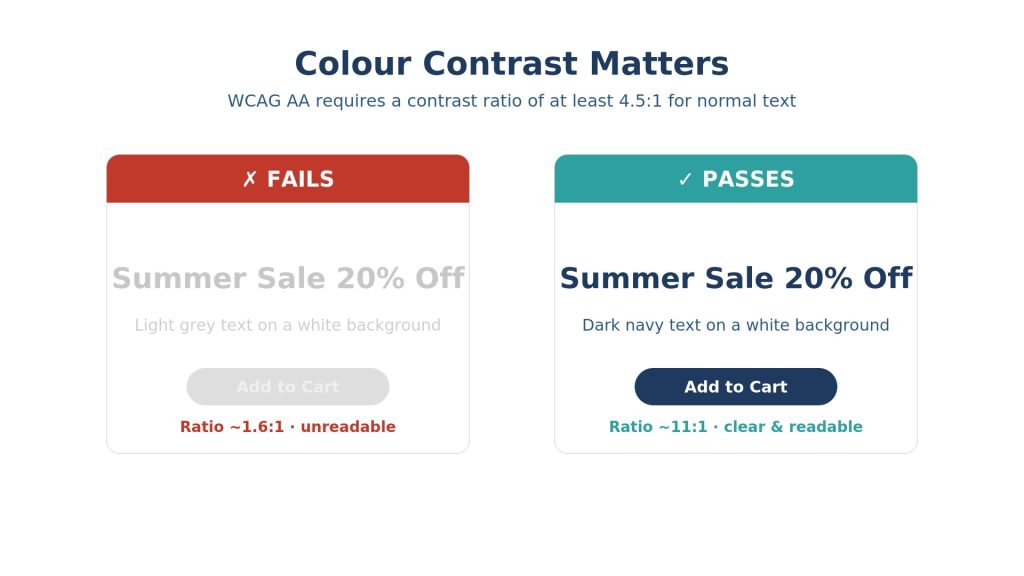
- Low-contrast vision: Your sale banner uses light gray text on a white background. Customers with low vision or colour blindness can’t read the offer, so it never converts.
- Cognitive and neurological differences: An autoplaying video with no captions or a cluttered, unpredictable layout creates friction that pushes users away before they engage.
There is also a hidden benefit that even fully able-bodied shoppers enjoy: accessibility improvements almost always improve the experience for everyone. Clear navigation, readable text, descriptive links, and fast keyboard interaction reduce friction across the board. And because search engines parse the same semantic structure that screen readers rely on, accessible stores tend to perform better in SEO too. Alt text, proper heading hierarchy, and descriptive link text are accessibility wins and ranking wins at the same time.
The Most Common Accessibility Failures on Shopify Stores
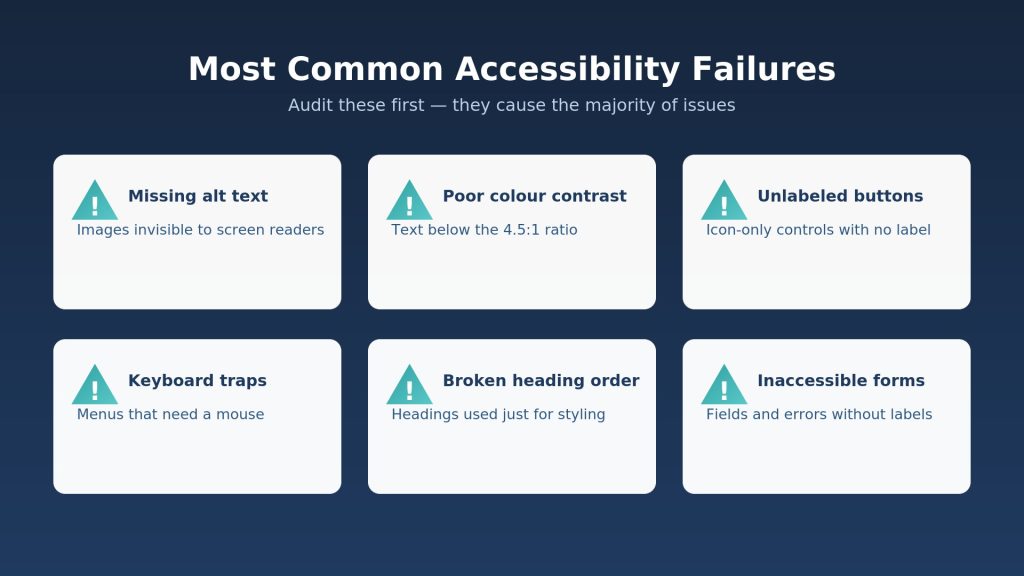
In practice, the same handful of issues account for the overwhelming majority of accessibility failures on Shopify storefronts. Here are the ones worth auditing first:
| Issue | Why It Fails |
| Missing alt text | Product and content images with no text alternative are invisible to screen readers. |
| Poor colour contrast | Text and buttons that don’t meet the 4.5:1 contrast ratio are unreadable for many users. |
| Unlabeled buttons & links | Icon-only buttons (cart, search, menu) with no accessible label confuse assistive tech. |
| Keyboard traps | Menus, popups, and modals that can’t be opened or closed without a mouse. |
| Broken heading order | Skipping from H1 to H4, or using headings purely for styling, breaks navigation. |
| Inaccessible forms | Form fields without labels and errors shown only by color leave users stuck at checkout. |
| Auto-playing media | Carousels and videos that move or play automatically with no pause control. |
A Practical Roadmap to WCAG Compliance
You don’t need to fix everything overnight, but you do need a plan. Here is a sensible order of operations for a Shopify merchant starting from scratch.
1. Run an Honest Audit
Start by understanding where you actually stand. Combine automated tools with manual testing, because automated scanners typically catch only a portion of real-world issues:
- Automated tools: Free browser-based scanners like WAVE or the axe DevTools extension flag many issues instantly on any page.
- Keyboard test: Try navigating your entire store — browse, add to cart, and check out — using only the Tab, Enter, and arrow keys. If you get stuck, so will your customers.
- Screen reader test: Use the built-in screen reader on your device (VoiceOver on Mac/iOS, TalkBack on Android, or NVDA on Windows) to experience your store the way a blind user would.
2. Start With a Solid Theme Foundation
If you’re still on a very old theme, upgrading to a modern, well-maintained theme built on current Shopify standards gives you a much stronger accessibility baseline. Shopify’s own free themes and many reputable premium themes now document their accessibility features. Choosing a good foundation means you spend your effort on refinement rather than rebuilding from a broken base.
3. Fix the High-Impact Basics
- Alt text: Add descriptive alt text to every meaningful image, especially product photos. Decorative images should have empty alt attributes so screen readers skip them.
- Contrast: Adjust your theme colours so text meets at least a 4.5:1 contrast ratio against its background. This is one of the most common and easiest wins.
- Labels: Ensure every interactive element — buttons, links, icons — has a clear, accessible label.
- Headings: Use a single H1 per page and a logical heading order. Don’t choose headings based on how big the text looks.
- Forms: Confirm form fields have visible labels and that errors are communicated with text, not color alone.
4. Vet Your Apps Carefully
Every app that injects content onto your storefront — reviews, popups, upsells, search — can introduce accessibility problems. Before installing, check whether the app documents accessibility support, and re-test your key pages after adding anything new. Be especially wary of “one-click accessibility” overlay widgets. These tools promise instant compliance, but the accessibility community has widely criticised them and have themselves been named in lawsuits. They are not a substitute for fixing the underlying code.
5. Document and Maintain
Accessibility is not a one-time project; it degrades every time you add a product, run a campaign banner, or install an app. Build a lightweight routine: publish an accessibility statement on your site, retest after major changes, and treat accessibility as part of your standard quality checklist alongside performance and SEO.
The Bottom Line
Accessibility compliance is one of the rare areas were doing the right thing and protecting your business point in exactly the same direction. On one side sits genuine legal exposure: a steady stream of lawsuits and demand letters that increasingly target ecommerce stores of every size, in multiple countries. On the other sits a large, underserved, and loyal customer base that you are turning away every day an inaccessible barrier stays in place.
The good news is that the path forward is well understood. WCAG 2.1 Level AA is a clear, achievable target. Most stores can eliminate the bulk of their risk by fixing a short list of high-impact issues — contrast, alt text, labels, keyboard access, and form usability — then maintaining good habits going forward. For a Shopify merchant, that is a modest investment against a real legal threat and a tangible revenue opportunity.
Treat accessibility not as a compliance burden, but as what it really is: a way to make your store work for everyone who wants to buy from you. That is good ethics, good law, and good business all at once.
If you’re not sure where your store stands, a professional accessibility audit is the best place to start. Sweans’ Website Accessibility Audit identifies WCAG compliance issues, highlights areas of legal risk, and provides clear, prioritised recommendations to help you make your website more accessible and compliant.
