


There’s a particular kind of stress that comes from a customer messaging support to ask where their order is, only for someone on your team to discover the item sold out three days ago at the warehouse the order was routed to, even though your website still showed it in stock. Multiply that by a few dozen SKUs across a few different locations, and you’ve got a full-time headache instead of a business.
Single-location Shopify stores have it relatively easy. One stockroom, one number, one source of truth. The moment you add a second location, a second warehouse, a retail store, a 3PL, a pop-up, inventory stops being a simple count and becomes a coordination problem. And coordination problems are where overselling and stockouts quietly eat into revenue, customer trust, and your team’s patience.
This article walks through why multi-location inventory gets complicated so quickly, the specific failure points that cause overselling and stockouts, and the practical systems, both Shopify-native and third-party, that fix them.
Why Multi-Location Inventory Is Harder Than It Looks
On the surface, tracking inventory across locations sounds like basic arithmetic: add up what’s at each location, and that’s your total available stock. In practice, several things break that simple math.
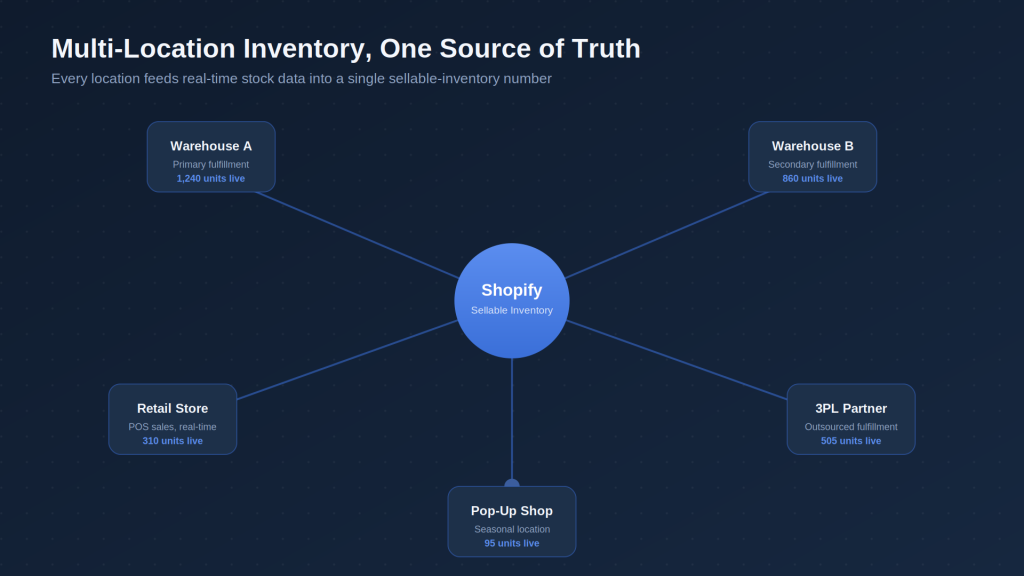
First, inventory isn’t static. It’s constantly being adjusted by sales, returns, transfers between locations, damaged-goods write-offs, and manual counts. Every one of those events needs to be reflected accurately and quickly, or your “available” number drifts from reality.
Second, not every unit at every location is actually sellable. Some might be reserved for wholesale orders, held for a specific channel, damaged and awaiting write-off, or physically present but not yet checked into the system. A location can show 40 units on paper while only 25 are genuinely available to sell online.
Third, fulfillment logic adds a layer of decision-making that single-location stores never have to think about. When an order comes in, which location should fulfill it? The nearest one? The one with the most stock? The one that minimises shipping cost? Get this wrong consistently and you end up with unnecessary split shipments, higher shipping costs, and locations that oversell because the system routed too many orders to the same low-stock warehouse.
Finally, sync delays and system gaps are where a lot of the real damage happens. If your POS, your 3PL, and your Shopify store don’t talk to each other in near-real-time, there’s a window, sometimes minutes, sometimes hours, where two different systems believe there’s more stock than actually exists.
The Core Problem: Overselling
Overselling happens when your store lets a customer complete a purchase for an item that isn’t actually available. It’s the single most damaging inventory failure in ecommerce, because it doesn’t just cost you a sale. It costs you a customer’s trust, forces a refund or a frustrating substitution conversation, and often triggers a support ticket that eats up staff time that should have gone toward growing the business.
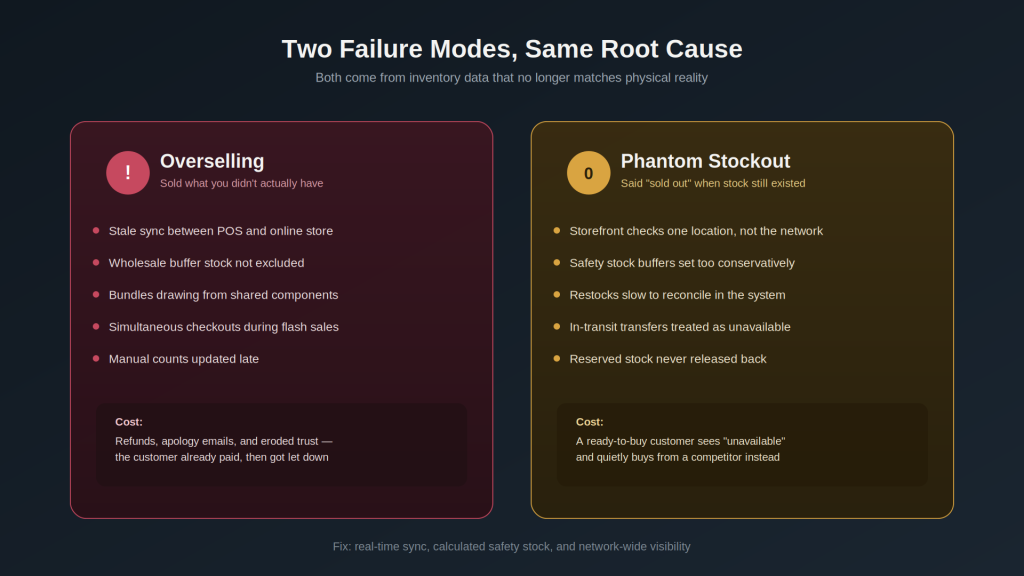
A few common causes of overselling in multi-location setups:
Stale sync between systems. If your retail POS and your online store don’t update inventory in real time, a unit sold in-store can still show as available online for anywhere from a few minutes to a few hours, depending on your integration.
Buffer stock not accounted for. Some brands hold back a portion of stock at each location for wholesale, B2B, or in-store-only sales. If that buffer isn’t excluded from what Shopify shows as sellable online, you’re effectively overselling by design.
Bundle and kit mismatches. If a bundled product draws from the same underlying component inventory as items sold individually, and that relationship isn’t tracked correctly, you can oversell the individual components without either product ever showing as out of stock.
High-velocity flash sales or drops. A sudden spike in simultaneous orders can outpace how quickly your system decrements available stock, especially with several checkouts happening at once for the same limited-quantity item.
Manual inventory counts falling out of date. If someone updates a spreadsheet or a legacy system but the change doesn’t sync back to Shopify promptly, the online store keeps selling against a number that no longer reflects reality.
The Other Half of the Problem: Stockouts (Even When Stock Exists)
Stockouts get less attention than overselling because they don’t generate the same kind of angry support ticket. A customer just sees “sold out” and moves on, or worse, buys from a competitor instead. But a phantom stockout, where a product shows as unavailable even though stock genuinely exists somewhere in your network, is just as costly. You’re turning away a paying customer because of a data problem, not a supply problem.
This usually comes down to a few things:
- Location-level visibility without network-level thinking. If your storefront only checks stock at a customer’s “assigned” fulfillment location instead of considering your full network, you can show “out of stock” for a product that’s sitting in a different warehouse ready to ship.
- Overly conservative safety stock settings. Safety stock buffers protect against overselling, but if they’re set too high or never revisited, they can make a product look unavailable long before it’s genuinely gone.
- Slow reconciliation after restocks. A shipment arrives and gets physically shelved, but if it takes a day or two to reflect in Shopify, you’re sitting on sellable inventory that isn’t actually being sold.
Building a Multi-Location Inventory System That Actually Holds Up
Centralise inventory logic instead of managing locations independently
The biggest mindset shift multi-location merchants need to make is treating inventory as one connected network rather than a set of separate silos that happen to share a Shopify account. Shopify’s native multi-location inventory feature lets you track stock per location and choose which locations are eligible to fulfill online orders, but the real value comes from how you configure the rules around it, not just from turning the feature on.
Decide deliberately: should online orders pull from every physical location, or only from dedicated fulfillment centers? Mixing retail-floor stock with online fulfillment sounds efficient, but it introduces far more risk of overselling, since retail sales happen in real time at the register and any sync delay creates a mismatch.
Set fulfillment priority rules that reflect your actual logistics, not just proximity
Shopify allows you to set a location priority order for fulfillment. Many merchants default to “closest location to the customer,” which minimises shipping cost and time, a reasonable starting point. But it’s worth revisiting this logic periodically. If one location consistently runs low on fast-moving SKUs, routing every nearby order there first will guarantee it oversells or stocks out faster than a location further away with healthier stock levels.
For stores with more complex logistics, multiple 3PLs, a mix of owned warehouses and dropship vendors, or seasonal fulfillment centers, a dedicated inventory or order-routing app that can factor in real-time stock levels alongside shipping cost tends to outperform simple proximity-based rules.
Build in safety stock — but calculate it, don’t guess it
Safety stock exists to create a buffer against the sync delays and reporting lags that are inevitable in any multi-location setup. The mistake most merchants make is picking a round number (10 units, 5%, whatever feels safe) and never revisiting it.
A more reliable approach ties safety stock to actual sales velocity and replenishment lead time for each SKU and location combination. A slow-moving product with a short reorder cycle needs a much smaller buffer than a fast-moving product that takes weeks to restock. Static, one-size-fits-all safety stock either wastes sellable inventory on overly cautious products or fails to protect against overselling on your fastest movers.
Automate low-stock alerts and reorder points
Manually checking stock levels across multiple locations doesn’t scale past a handful of SKUs. Setting automated low-stock thresholds, ideally per location, not just store-wide, means your team gets a warning before a stockout happens instead of finding out from a customer complaint. Shopify Flow can handle a lot of this natively: triggering internal alerts, tagging products, or even adjusting visibility when stock at a given location crosses a threshold, without needing a developer to build it from scratch.
Reconcile regularly, not just annually
Physical inventory counts don’t need to be a massive once-a-year event to be effective. Cycle counting, regularly auditing a rotating subset of SKUs rather than everything at once, catches discrepancies between what your system says and what’s actually on the shelf far faster, and with much less operational disruption. The longer a discrepancy goes unnoticed, the more overselling or phantom stockouts it causes in the meantime.
Treat transfers between locations as first-class events
Stock moving between locations is one of the most common places for numbers to quietly go wrong. If a transfer is recorded as “shipped” from the origin location before it’s confirmed “received” at the destination, there’s a window where neither location’s numbers are fully accurate. The shipping location has already deducted it, but the receiving location hasn’t added it yet. Building a consistent, documented transfer process, and making sure your systems reflect in-transit stock rather than treating it as simply gone, closes a surprisingly large gap.
Choose integrations that sync in near-real-time, not batches
If your POS, 3PL, or ERP only syncs with Shopify on an hourly or nightly batch schedule, that gap is exactly where overselling incidents cluster, especially during high-traffic periods. When evaluating inventory or fulfillment apps, sync frequency deserves as much scrutiny as feature lists. A tool with fewer bells and whistles but genuinely real-time syncing will often outperform a feature-rich one that updates on a delay.
Signs Your Inventory System Needs Attention
A few warning signs tend to show up before things get bad enough to generate regular customer complaints:
- Customer service frequently apologises for “actually out of stock” orders
- Staff routinely double-check stock manually before confirming large or wholesale orders because they don’t trust the online numbers
- Certain locations consistently oversell while others sit on excess stock of the same SKU
- Physical counts regularly turn up meaningful discrepancies from system numbers
- Restocks take more than a day to reflect as available online
If more than one or two of these sound familiar, it’s usually a sign that the underlying process, not just the software, needs a rework.
Final Thoughts
Multi-location inventory management isn’t glamorous work, and it rarely shows up in a pitch deck the way a slick new marketing channel might. But it’s one of the few areas where getting the details right has a direct, compounding effect on customer trust and operational cost. Getting it wrong quietly erodes both, order after order.
The good news is that none of this requires reinventing your operations from scratch. It requires being deliberate about fulfillment logic, treating safety stock as a calculated number rather than a guess, closing the sync gaps between your systems, and building habits, like cycle counting and disciplined transfer tracking, that keep your data honest over time. Get those fundamentals right, and overselling and phantom stockouts stop being a recurring fire to put out and become the rare exception instead of the norm.
Getting multi-location inventory right often comes down to how your Shopify setup is configured, not just which app you buy. Contact us if you’d like an expert to look at your store’s setup and fix what’s causing the overselling or stockouts.
