



For a long time, Shopify merchants had limited options when it came to managing structured content. Most stores relied on a combination of hard-coded theme sections, scattered meta fields, and third-party apps to display things like FAQs, size charts, certifications, or brand information. While this approach worked on the surface, it often created bigger problems behind the scenes.
Admin panels became cluttered. Content was duplicated across multiple products and pages. Even small updates required manual edits in several places or developer involvement. Over time, this led to higher maintenance costs, slower updates, and a storefront that was difficult to scale.
That’s exactly where Shopify Metaobjects come in.
Metaobjects introduce a smarter, more structured way to manage and reuse content across your Shopify store without writing custom code or installing extra apps. If you have ever struggled to keep FAQs consistent, manage compliance content, or maintain structured product data, Metaobjects provide a clear and practical solution.
In this guide, we’ll break down what Shopify Metaobjects are, how they differ from meta fields, real-world use cases, SEO benefits, and why they’re a game-changer for merchants who want truly dynamic storefronts.
What Are Shopify Metaobjects?
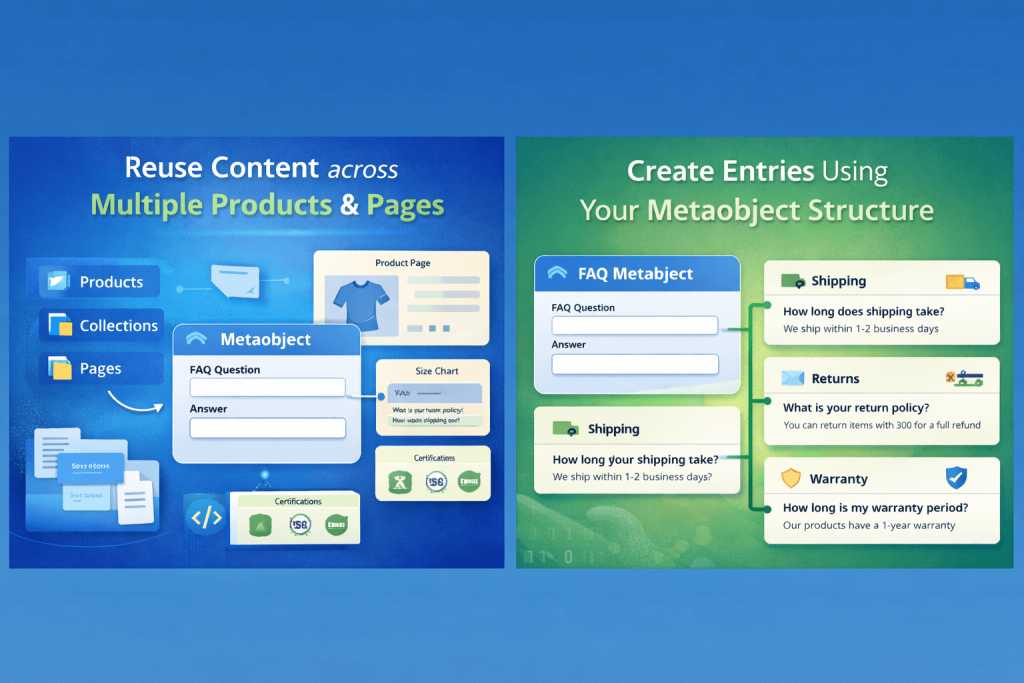
Shopify Metaobjects are structured, reusable content models that live independently inside Shopify Admin. Instead of tying content directly to a product or page, Metaobjects allow you to define content once and reuse it anywhere across your store.
If you’re familiar with other platforms, you can think of Metaobjects as:
- Custom Post Types in WordPress
- Structured content models in modern headless CMS platforms
- Reusable content entities in systems like Contentful or Sanity
Each Metaobject consists of two key parts:
- A Definition – This defines the structure of the content (fields, field types, validations).
- Entries – These are the actual content items created using that structure.
For example, you might create:
- A “FAQ” Metaobject definition
- Multiple FAQ entries such as Shipping, Returns, Warranty, and Payments
Once created, these entries can be referenced across products, collections, pages, or theme sections—without duplicating content.
In short, Metaobjects allow Shopify to function more like a modern CMS, not just an eCommerce platform.
Metaobjects vs Meta fields: Understanding the Difference
One of the most common areas of confusion is the difference between metafields and metaobjects. While they are related, they serve very different purposes.
Meta fields
Meta fields are designed to store single, contextual pieces of data that belong to a specific resource such as a product, collection, order, or customer.
Key characteristics:
- Directly attached to a specific entity
- Best for simple values (text, numbers, toggles)
- Difficult to reuse across multiple pages
- Hard to manage at scale
- Often leads to repeated data across products
Meta fields are ideal for things like:
- A single product subtitle
- A material type
- A warranty duration value
Metaobjects
Metaobjects, on the other hand, are standalone content entities.
Key characteristics:
- Centrally managed
- Fully reusable
- Designed for repeatable, structured content
- Can be referenced by multiple products or pages
- Much easier to scale and maintain
Simple Comparison Between Meta Fields and Metaobjects
| Feature | Meta fields | Metaobjects |
| Reusable content | Limited | Yes |
| Central management | No | Yes |
| Structured content | Basic | Advanced |
| Best for | Single values | Dynamic content blocks |
In short, Meta fields store data. Metaobjects manage content.
Why Metaobjects Are a Game-Changer for Shopify Merchants
Metaobjects solve several long-standing Shopify pain points—especially for growing stores and content-heavy businesses.
1. No More Duplicate Content
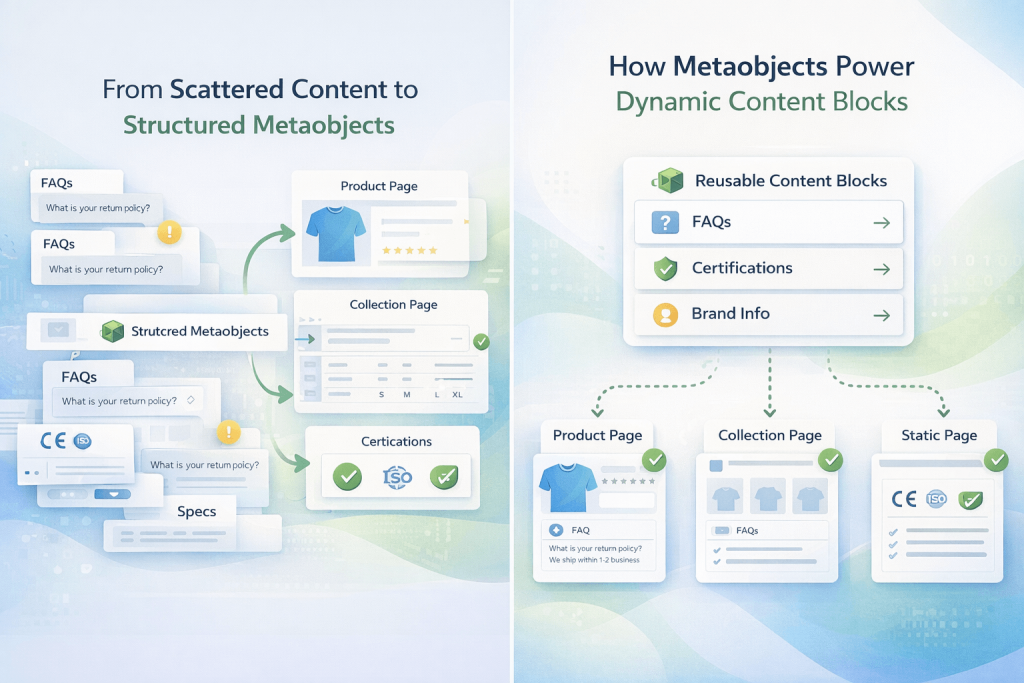
Instead of copying and pasting the same FAQ, certification details, or specifications across multiple products, you manage that content once and reuse it everywhere.
2. A Cleaner Shopify Admin
Your product editor stays focused on product-specific details instead of being overloaded with large content blocks that don’t belong there.
3. Faster Updates Across the Store
Update a single Metaobject entry, and the changes instantly reflect everywhere it’s used—no manual syncing required.
4. Reduced Dependency on Apps
Many Shopify stores rely on apps for FAQs, size charts, brand sections, or trust badges. Metaobjects can replace several of these while improving performance.
5. Built for the Future
Metaobjects are fully native to Shopify and designed to work seamlessly with Online Store 2.0. They’re actively supported by Shopify’s roadmap, making them a long-term solution—not a workaround.
Common Real-World Use Cases for Shopify Metaobjects
Let’s look at how Metaobjects are used in real Shopify stores.
1. Dynamic FAQ Sections
FAQs are one of the most common examples of repeated content.
With Metaobjects:
- Create a FAQ Metaobject
- Fields might include: Question, Answer, Category
You can then:
- Assign FAQs to specific products or collections
- Display different FAQ sets based on product type
- Maintain consistent answers across the entire store
When a policy changes, you update the FAQ once—every page updates automatically. This is especially useful for shipping, warranty, returns, or compliance-related questions.
2. Product Specifications & Comparison Tables
For technical, B2B, or electronics stores, product specifications can quickly become messy.
Using Metaobjects:
- Create a Product Specification Metaobject
- Fields: Label, Value, Unit
Benefits include:
- Clean, structured tables
- No HTML inside product descriptions
- Easy updates without breaking layouts
- Reusable specs across similar products
This approach keeps product pages clean while maintaining consistency across your catalog.
3. Certifications, Compliance & Trust Badges
For stores operating in regulated markets such as the EU, UK, or Middle East, compliance content is critical.
With Metaobjects:
- Create a Certification Metaobject
- Fields: Name, Logo, Description, External Link
You can assign certifications like:
Updating a certification once updates it across all relevant products—ensuring accuracy and trust.
4. Brand or Manufacturer Information
If your store sells products from multiple brands, Metaobjects are extremely powerful.
You can create a Brand Metaobject with fields such as:
- Brand name
- Logo
- Description
- Website or social links
This enables:
- Dynamic brand sections on product pages
- Consistent brand storytelling
- Better SEO through structured, reusable content
It also avoids repeating brand descriptions across dozens of products.
5. Store Locations or Service Areas
For merchants with physical stores or service locations, Metaobjects simplify location management.
A Store Location Metaobject might include:
- Address
- Contact details
- Business hours
- Map links
You can dynamically display:
- Store location blocks
- Pickup availability
- Region-specific messages
All without hardcoding content into pages.
How Metaobjects Work With Shopify Themes
Metaobjects are designed specifically to work with Online Store 2.0 themes.
Using Metaobjects in the Theme Editor
Most modern Shopify themes support:
- Dynamic sources
- Metaobject field bindings
This means:
- No Liquid coding is required for content updates
- Content managers control everything from the theme editor
- Developers build flexible sections once, and merchants manage content forever
For fully custom themes, developers can still render Metaobjects using Liquid—but daily content updates remain code-free.
Step-by-Step: Creating Your First Metaobject
Here’s a simplified workflow to get started:
- Go to Shopify Admin → Content → Metaobjects
- Click Add definition
- Define your fields (text, image, URL, reference, etc.)
- Save the definition
- Add entries under the Metaobject
- Connect those entries to products, pages, or theme sections
Once set up, your content becomes modular, reusable, and scalable.
SEO Benefits of Using Metaobjects
Metaobjects don’t just improve content management. They also support better SEO.
Why Search Engines Prefer Structured Content
- Clear content hierarchy
- Consistent terminology
- Reduced duplicate content
- Better internal linking opportunities
FAQ Metaobjects, for example, can:
- Improve eligibility for rich results
- Increase time on page
- Enhance crawlability
When combined with proper theme implementation, Metaobjects help create clean, search-engine-friendly content structures.
When Metaobjects Are Better Than Apps
Metaobjects are often the better choice when:
- The content is mostly static
- You want full ownership and control
- Performance matters
- You want to reduce long-term app costs
Apps still make sense for:
- Advanced logic
- User-generated content
- Analytics-heavy or interactive features
But for structured content management, Metaobjects are usually the smarter long-term solution.
Common Mistakes to Avoid
- Overusing Metaobjects
Not every piece of data needs a Metaobject. Simple values still belong in meta fields. - Poor Field Planning
Think ahead before creating definitions. Poor planning leads to rebuilds later. - Ignoring Theme Compatibility
Make sure your theme properly supports dynamic sources. - Mixing Content and Logic
Metaobjects manage content—not business logic or calculations.
Who Should Use Shopify Metaobjects?
Metaobjects are ideal for:
- Growing Shopify stores
- Shopify Plus merchants
- B2B and compliance-heavy businesses
- Large catalogs with repeated content
- Teams managing content collaboratively
As your store grows, Metaobjects become a practical necessity.
Final Thoughts
Shopify Metaobjects change how content is structured and managed across a store. They allow merchants to organise reusable, structured content without turning Shopify into a complex CMS or relying on constant development work. The result is greater flexibility than standard product pages, with far less overhead than fully custom builds.
For growing stores, Metaobjects make it easier to keep content consistent, update information quickly, and scale without creating maintenance issues. They reduce reliance on apps and custom code while improving performance and long-term manageability, making them a strong foundation for dynamic Shopify stores.
As Shopify experts and a certified Shopify Plus Partner, Sweans helps brands build and scale smarter on Shopify. Contact us to see how we can support your next stage of growth.
